
There is something deceptively powerful about family photos. One image can take you right back to a summer holiday in Cornwall, or your child’s first laugh or an impromptu picnic where everything was perfect. These moments matter. And when we stitch them together intentionally, they are more than images — they are stories. If you’ve ever wanted to post those stories online for friends and family, you might have wondered how to make a Facebook slideshow that is as warm, personal and uniquely yours as the experiences it features.
Facebook used to have a built-in slide show tool, but it’s mostly gone now — and so many of us are left with boring static photo posts. Great news: you don’t need advanced editing skills — or expensive software — to make your family photos come alive. A basic video slideshow of their work is also well within reach. And let’s make your photo and clip collection tell a story that will have them all hitting “like” — but more importantly, feeling that warm, fuzzy connection.
Why Bother with a Slideshow?
Let’s be honest: scrolling through individual photos online doesn’t always do justice to the moment. A well-made slideshow adds rhythm. It adds emotion. It gives your family story room to breathe. Whether it’s your toddler’s first beach trip or a quiet Christmas morning, weaving those images together with music and gentle transitions helps others feel what you felt. And for relatives who live far away? It’s like handing them a little piece of your world.
Keep It Short, Keep It Sweet
You don’t need dozens of pictures. In fact, less is often more. Sliders running between 1 and 3 minutes are the most effective at keeping attention — especially on social feeds. Choose 8 to 12 of your best images. Focus on variety: a long shot of a landscape, a close-up of hands holding, an authentic laugh.
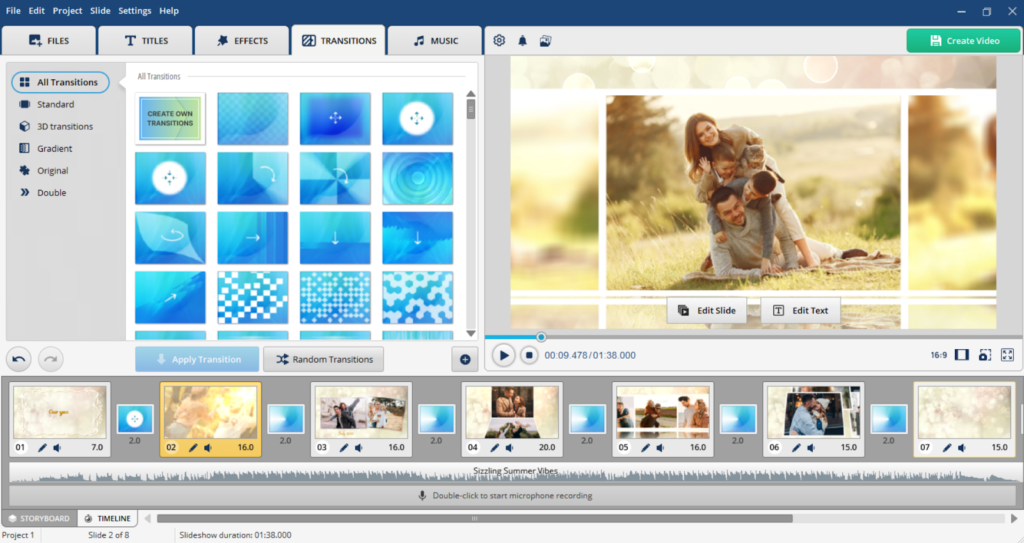
Look for a program that guides you through the process smoothly. For instance, SmartSHOW 3D is often cited as one of the best slideshow makers for Facebook options for everyday users. It is designed for people who want professional-looking results without a steep learning curve. It handles all the tricky parts like transitions and effects, letting you focus on the fun part – telling your story. You can also use Canva or Smilebox if you prefer something browser-based—but SmartSHOW 3D gives you more control over pacing, effects, and music.

A Simple Step-by-Step Guide
Choose your photos
Start by gathering your favorites in a single folder. Crop or rotate if necessary, but don’t go overboard with the editing. Some of the most true shots are natural and slightly flawed.
Add music to match the mood
A soothing piano track for a baby’s first year. Strummy acoustic guitar for a summer road trip. SmartSHOW 3D comes with royalty-free music, or you can upload your own. Just be sure the volume doesn’t silence any voice notes you may add.
Include a title or short message
One line is enough: “Our Lake District Escape – July 2025” or “To Grandma, with love.” Use clean, readable fonts. Avoid flashy animations — they distract from the emotion.
Pick smooth transitions
Gentle fades or slow zooms work beautifully for family moments. Skip flashy spins or glitch effects unless you’re going for a very specific vibe. The goal is warmth, not spectacle.
Preview and refine
Watch your slideshow at least twice. Does the music swell at the right moment? Does the sequence feel natural? Tweak as needed — this is your story, after all.
Beyond Facebook: Sharing Your Story Everywhere
Once your video’s ready, it’s not just for Facebook. You can easily create a slideshow for Facebook post, then repurpose the same file for Instagram Reels or YouTube Shorts. Just check the aspect ratio—most slideshow tools, including SmartSHOW 3D, let you export in 9:16 (vertical) or 16:9 (landscape). For Reels and Shorts, vertical works best. For Facebook or YouTube, the landscape often looks more polished.
Style Tips That Make a Difference
- Tempo matters – Let each photo linger long enough to be seen, but not so long that viewers scroll away. Two to three seconds per image is usually perfect.
- Match music to memory – Joyful moments deserve light, bright tunes. Reflective ones call for something slower, maybe with strings or a solo piano.
- Consider the mood – A seaside holiday might suit warm filters and breezy music. A winter gathering? Cooler tones, soft lighting, and something nostalgic.
- More images, less text – Let your pictures and songs tell the story, not captions. Keep words minimal and meaningful.
Final Thoughts
Family photo slideshow ideas don’t have to be grand or complicated. What they need is a heart. It’s not in seamless transitions or trendy filters — it’s about the quiet joy of reliving a shared moment, and inviting others to step into it with you. Whether you’re commemorating a birthday, paying tribute to a loved one or just saying “this is us,” your slideshow becomes a miniature time capsule. And in a world that’s ever too fast, that is worth sharing.
So go ahead. Gather those photos. Press play on a song that means something. And start building a slideshow that tells your family’s story — not with words, but with feeling.
Related posts:
 How to Perfect Family Photos: 5 Quick Tips to Remove Unwanted People or Objects
 5 Fantastic tips to create and organise your travel photos: Slideshows made easy
 5 Things You Should Start Saving for as a New Mum (That No One Tells You About)
 Bringing the Past to Life: A Busy Parent’s Guide to Restoring Old Family Photos


